


Perks are one of the most powerful ways to monetize a Substack. They work for almost any kind of publication, whether you write about fiction, finance, parenting, or politics. Good writing is everywhere, and most of it is free, so a paywall on posts alone is a harder sell than it used to be. A discount, a downloadable resource, a live session, or an invitation to join a private community can be just the thing to turn a free reader into a paying subscriber, and to keep them around long-term.
Until now, the hard part has been delivering your perks to subscribers. Substack didn’t natively support perks, so getting them to the right people often required a lot of MacGyvering as publishers made do with janky workarounds. There was also no native way to give annual subscribers a reward that monthly subscribers couldn’t also claim.
Substack's new subscriber perks feature closes that gap. It's available to all publishers with payments enabled, so you can set up perks for your publication today.
What Are Substack Subscriber Perks?
Substack Subscriber Perks are rewards for paid subscribers that live on a dedicated Perks tab on your publication, separate from your paywalled posts.
Perks unlock automatically based on a reader’s plan. You lock each perk to a tier, eligible subscribers can open it, and everyone else sees it locked with a prompt to upgrade.
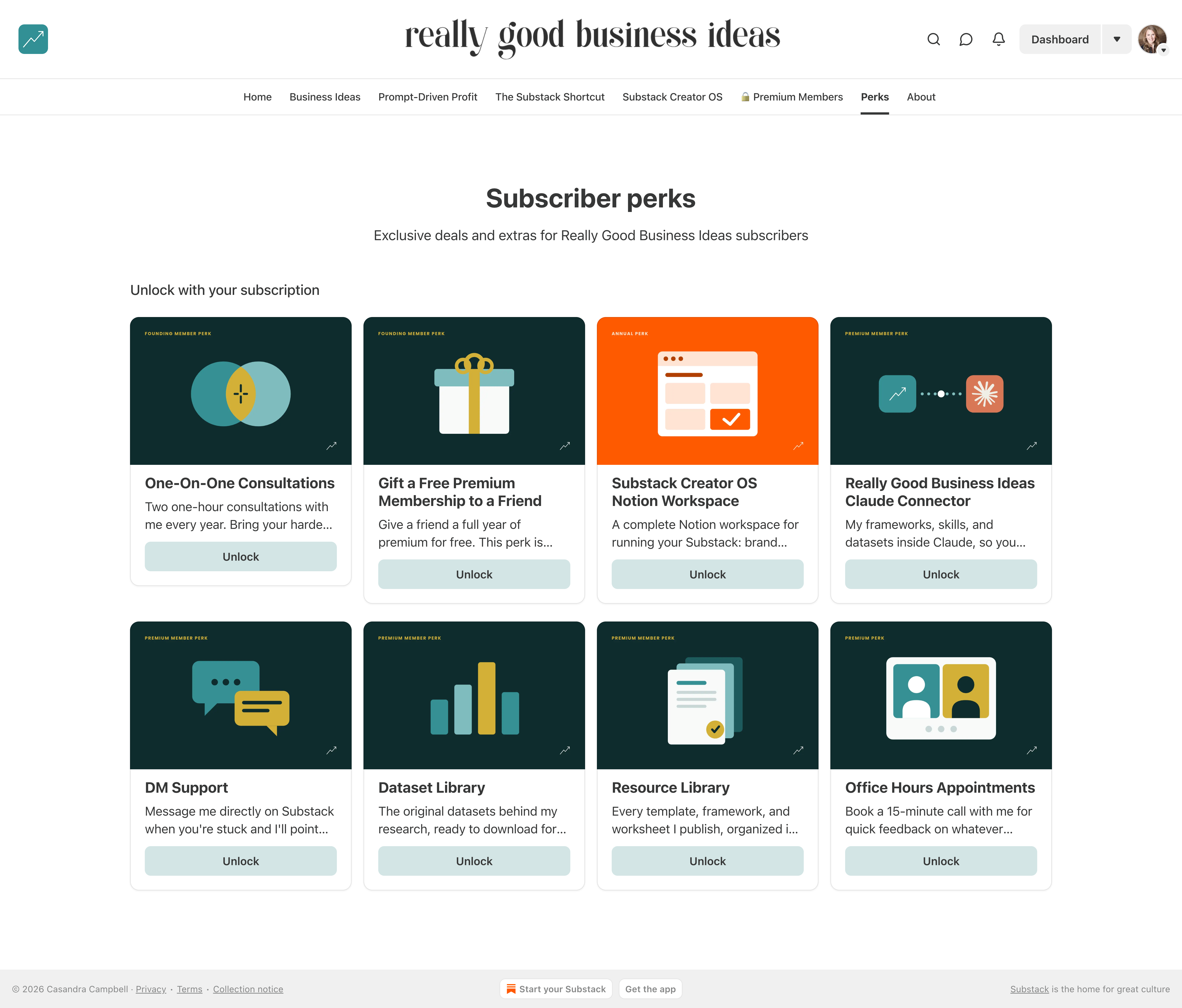
Substack has three paid plan types: monthly, annual, and founding. You can target a perk to a specific plan, so you can give annual or founding subscribers a reward that monthly subscribers don't get.
Before subscriber perks, you couldn’t differentiate perks by tier natively. Rewarding annual or founding subscribers with something monthly subscribers didn’t get meant delivering and tracking it by hand. Now you attach a perk to a specific tier, and Substack handles access automatically.
How Subscriber Perks Work With Substack Paid Subscriptions
Monthly and annual subscribers usually get the same perks, and the main difference is the price discount the annual plan offers. Some publishers also reserve higher-value perks for annual subscribers, so a reader can’t subscribe for a single month, claim a one-time perk, and cancel. Founding members typically get everything, plus an extra reward.
Until now, you couldn’t differentiate perks by tier natively, so an annual-only or founding-only reward had to be delivered manually. The new Subscriber perks feature solves this by letting you attach a reward to a specific plan and have Substack automatically handle access.

How to Set Up Subscriber Perks
Subscriber perks are available to all publishers with payments enabled. They work on your web publication only, not the Substack app.
To set up your subscriber perks, navigate to your publication’s dashboard, click on Settings, then Payments, and scroll to the bottom of the Benefits section, where you will see Subscriber perks.
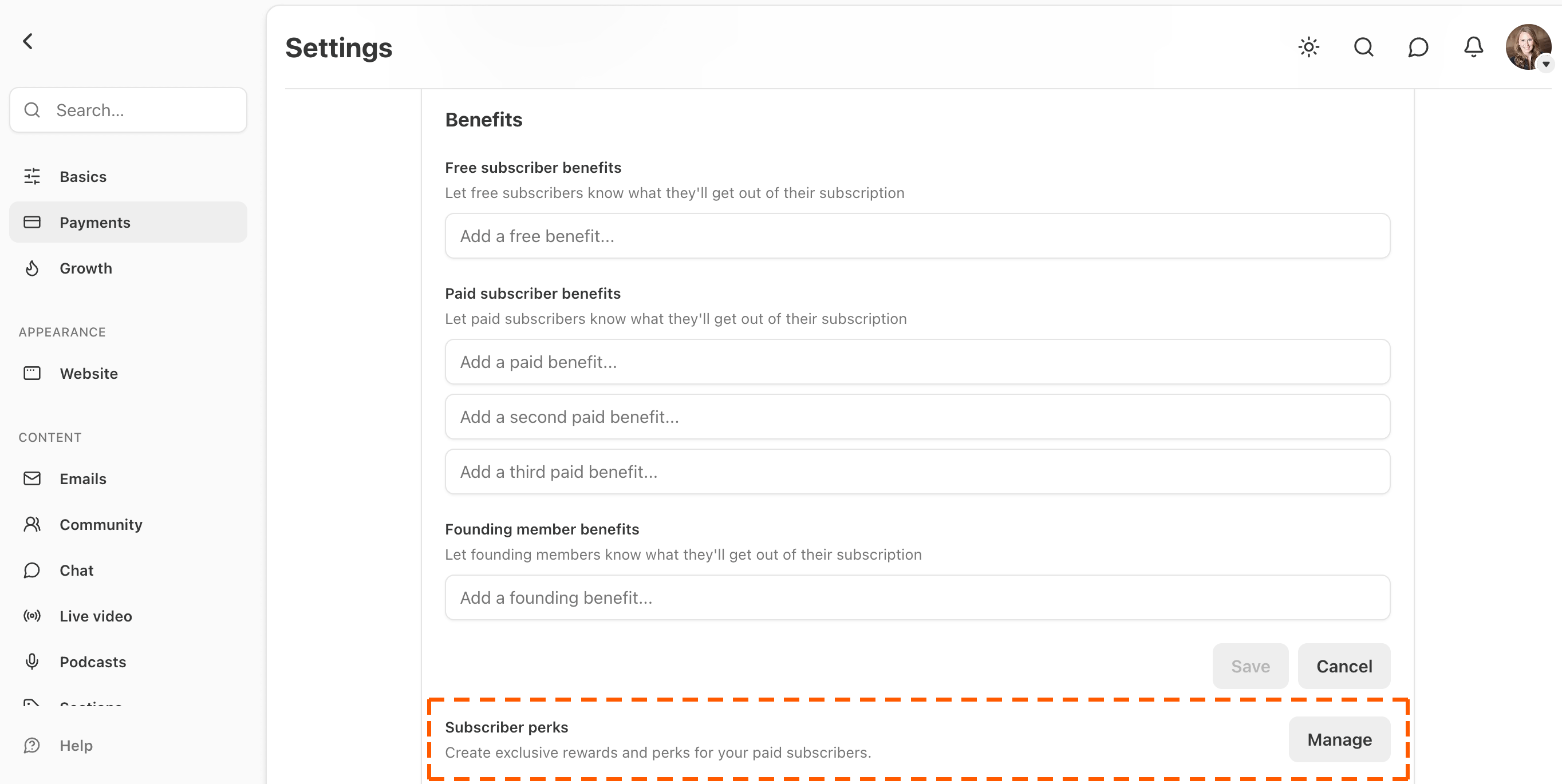
Once there, click Manage, followed by Create Perk.
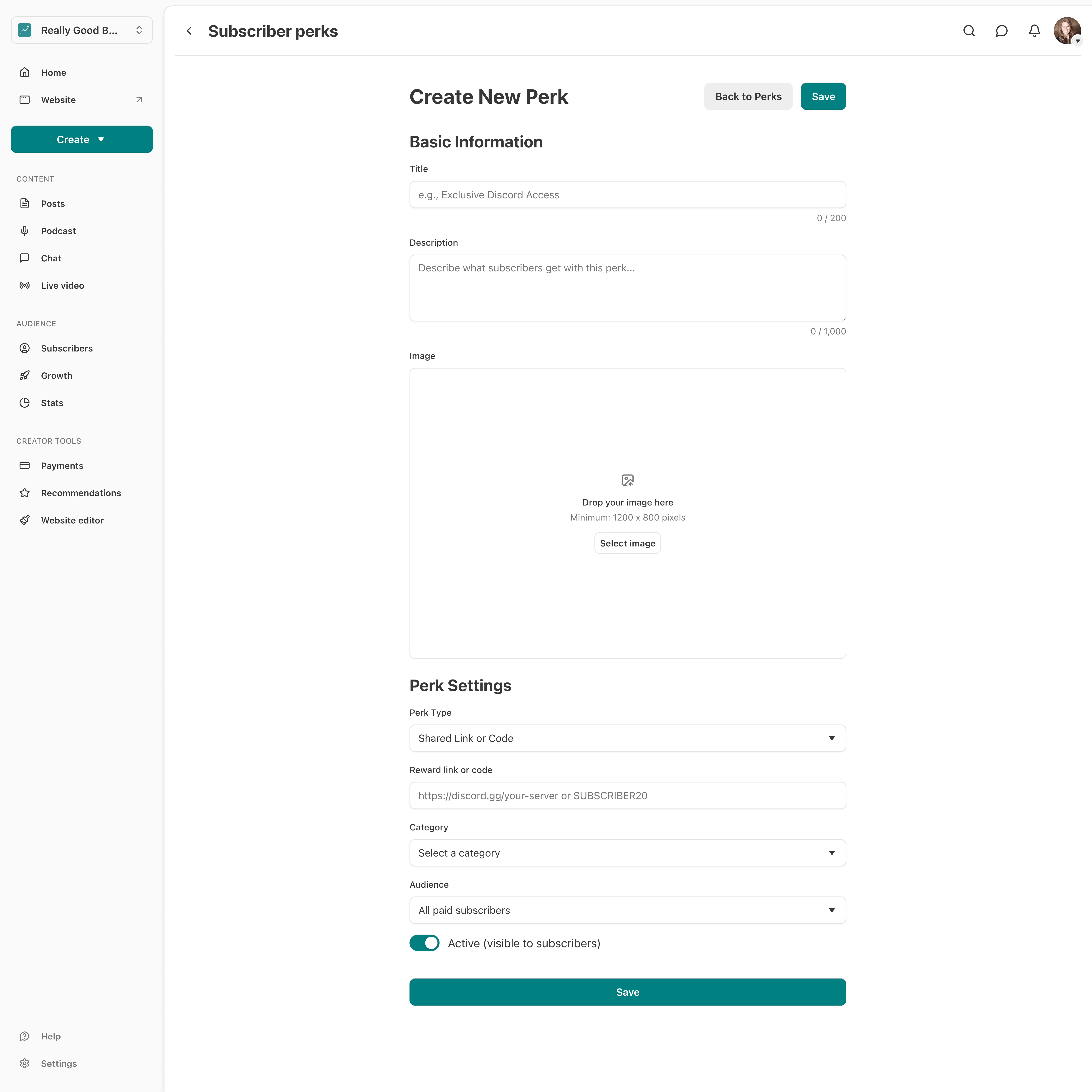
On the Create New Perk page, you’ll be able to name your perk, write a short description, upload a perk cover image (1200 × 800 px), choose which tier can access the perk, and set up a perk delivery method.
You can also limit a perk to new paying subscribers by turning on the New subscribers only toggle and setting a start date and time.
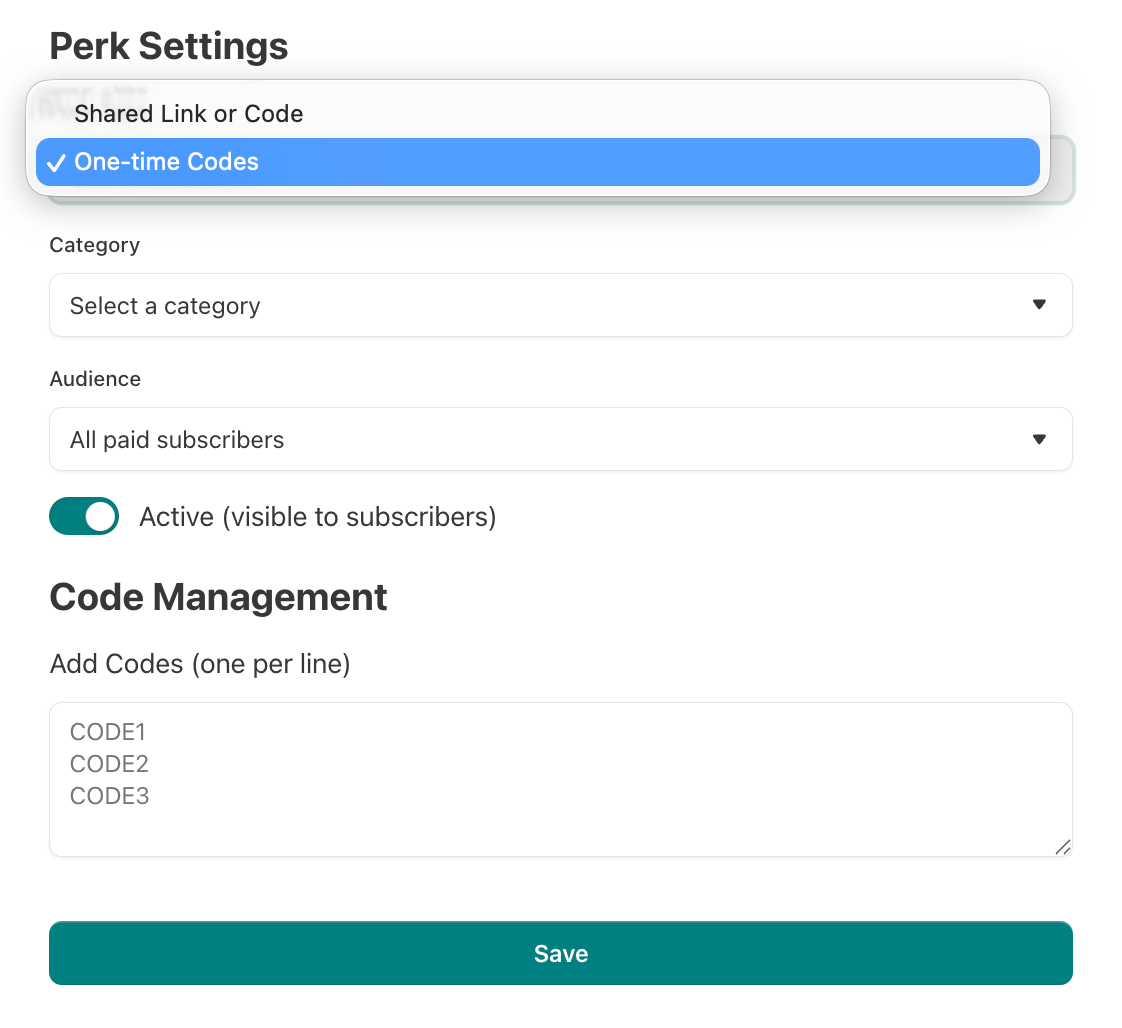
Substack offers five perk types: a discount or promo code, a digital download, a community invite, a link (like a Zoom session), or a Substack Live video.
A discount or promo code. Share a code for an external site, such as a discount with a SaaS partner. You can give every eligible subscriber the same code, or issue a unique, one-time-use code to each person (handy for something like a course).
A digital download. Upload a file for subscribers to download directly, such as a PDF, ebook, or zip file, up to 700 MB.
A community invite. Link subscribers to a private space, such as a Discord server.
A link. Point subscribers to an online resource, such as a Zoom session.
A Substack Live video. Give paying subscribers access to an upcoming live video.
The first time you publish a perk, a Perks tab is added to your publication’s navigation, where all your active perks appear. You can also find your perks page by adding /perks to the end of your homepage URL. For example, my perks page lives at reallygoodbusinessideas.com/perks.
You can rename or hide the Perks tab in the Website > Navigation bar section of your Settings. Click Edit next to "Perks" to rename it, or toggle it off to hide it.
When a subscriber visits your perks page, they will see all your perks listed with an option to “unlock” each one.
When a subscriber unlocks a perk, Substack warns them that doing so makes them ineligible for a refund for the rest of their current billing period. It's a smart safeguard that protects publishers from readers who claim a high-value perk and then ask for their money back.
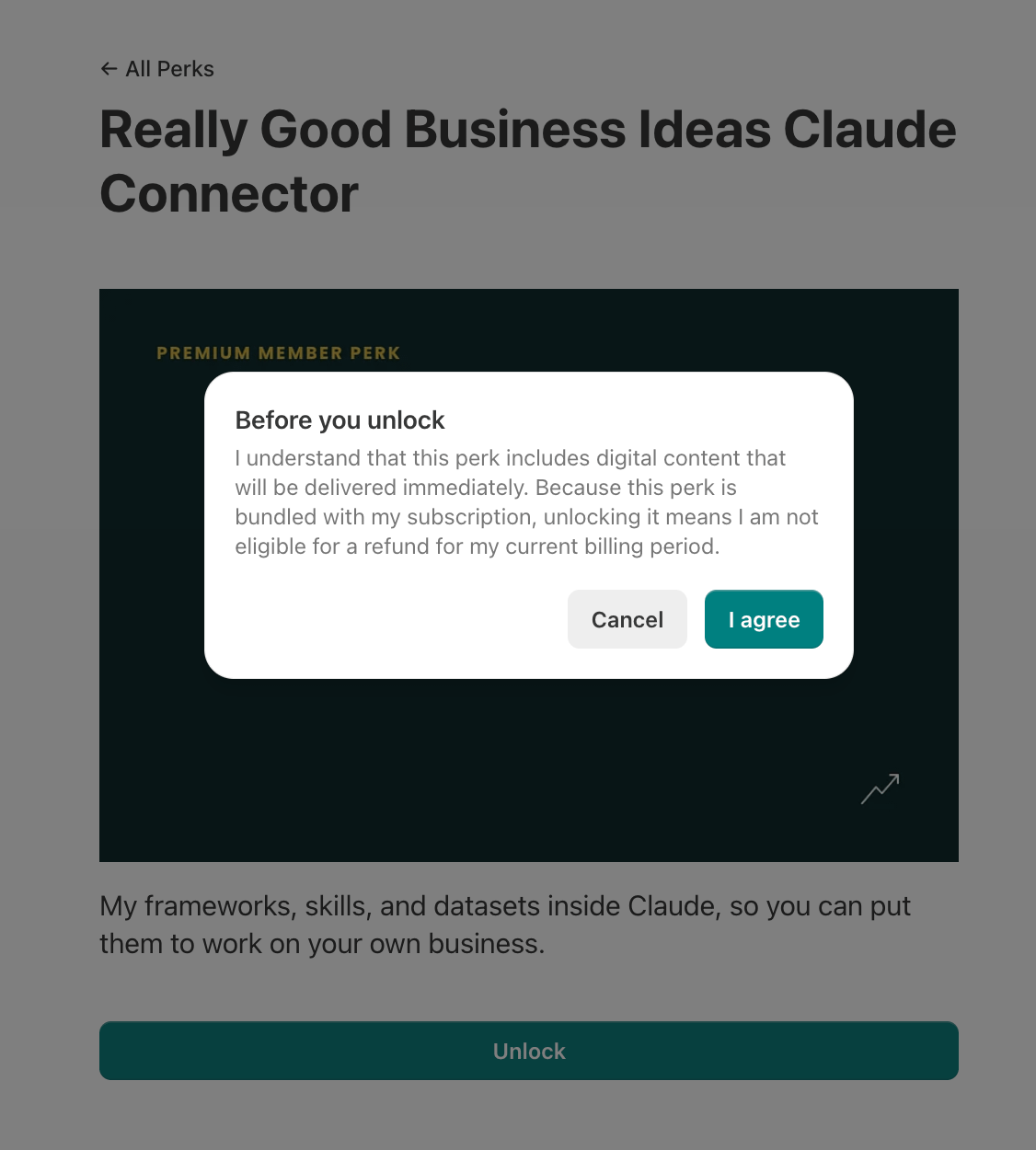
Subscribers who are not yet eligible will be guided through an upgrade process to access the perk, making the perks page a powerful paid conversion tool.
How to Design Perks That Drive Subscription Upgrades
A perks tab won’t make people pay for a perk they don’t want. The new feature handles delivery, but you still have to choose rewards worth paying for and decide which subscription level each one belongs to.
My recommendation is to keep your everyday perks, like community access or your content archive, on the base paid tier so every paying subscriber feels the value right away. Reserve your high-effort or high-cost perks, like physical products or one-on-one services, for annual and founding subscribers, where the increased price makes the work involved worth it for you.
See my analysis for the full menu of the types of subscriber perks you can offer, and how often top creators use each type.

Explore What 145 Top Publications Actually Offer
Now that you can deliver tiered perks natively, the next question is what to put on your Perks tab. The Paid Offers Database will help you find the answer. It has 520 real benefits from 145 top publications, organized by publication category, tier, perk type, and price, with screenshots of each upgrade page.
Paid Perks Database
Planning a paid tier can feel like guessing, especially when most paid newsletters live behind paywalls, and you can’t see what other people are actually offering.
That’s why I built the Paid Offers Database for Really Good Business Ideas Premium members. It’s a database of 145 Substack publications and 520 paid benefits across 29 categories that Claude can query for you in plain English.
I’ve collected all the data and captured screenshots of the upgrade pages so you can see exactly how each publication presents and prices its offers.
When you query the database, you get real examples back.
The publication’s actual perks and perk type at each paid tier, along with pricing.
A link to a screenshot of the actual upgrade page.
To use it, all you need to do is add the Really Good Business Ideas Connector to Claude, then type something like “What do top finance newsletters offer at the founding tier?” or “Which culture publications use community as a benefit at under $10/month?”
Ready, Set Your Perks!
The subscriber perks feature gives you a native way to deliver rewards to specific subscription plans.
If you don’t offer perks yet, they’re a great way to expand your offer and increase your monetization potential. Consider what you could give your subscribers to add more value to your paid tiers, then set up your first perk.
If you already offer perks, you can move them onto your perks tab and let Substack handle delivery, whether that’s a link, a code, a digital download, or a live video. Get your cover images ready and set them up.
To endless possibilities,
Casandra
Need More Help?
Really Good Business Ideas Premium: A membership designed to make starting and growing a profitable business easier. Full archive access, DM support, and a library of templates and resources.
Substack Creator OS: A complete operating system for planning, writing, growing, and monetizing your newsletter, all in one connected Notion workspace. (Right now, it’s free for Premium subscribers).
Work With Me Directly: Book a 1-on-1 consultation or coaching call to get personalized help when you need it. Think of it as a focused working session to get unstuck, gain clarity, or move something forward.
Build Your Brand on Substack: Whether you’re still deciding or ready to build, I’ll meet you where you are. I offer executive briefings and hands-on strategy sessions for marketing teams that want to win on Substack.

This is very helpful!
This is excellent and something creators have been asking for a long time. Seems a lot of goodies coming to Bestsellers, hope to see them soon ;)
One question: If you set up a Perk for the Annual tier and not the monthly tier, is there a way to set it up so the current monthly subscribers would keep their perks and it would only change for new monthly subscribers? I would love to make some changes, but don't want to penalize existing monthly subscribers.