


Substack has always made it easy to manage content access. With a couple of clicks, you can publish a post to everyone, limit it to paid subscribers, or keep it for your founding tier, and every reader lands on the version they’re entitled to. While building all of that yourself would take a team of seasoned developers to manage the complexity, one of the biggest benefits of Substack is that the platform makes it seamless by doing all the hard engineering work for you.
Still, managing content access has historically had a lot of limitations on Substack. Yes, you could set a whole post to free, paid, or founding-only, or start a post free and add a paywall partway through, but that was the extent of the control. The mid-post paywall, where everything above it stays public, and everything below it locks, is crude. Everything below the paywall locks with it, including signoffs and footnotes that should be accessible by all readers.
Substack has finally made it possible to show each subscriber tier something different inside the same post. A new feature called audience-specific content opens up a world of possibilities for content personalization, from converting first-time visitors to rewarding your most loyal subscribers.
Table of Contents
What Is Audience-Specific Content?
Audience-specific content is a set of blocks publishers can use to show different content to different subscriber tiers within a single post.
Substack splits your readers into four groups: Not subscribed, Free subscribers, Paid subscribers, and Founding subscribers, and each one can see unique content. The blocks handle the same content as the rest of the editor, so text, images, embeds, and anything else you’d normally add all work. You can add these blocks to any post type, so even a podcast or video post can carry tier-specific notes or links alongside the media. You can also add a For everyone else block as a fallback for anyone outside the group you picked. RSS feeds and search engines only see the Not subscribed version, so whatever you put there is what shows up in search and in the feed.
How to Add Audience-Specific Content
Setting up your first block takes less than a minute.
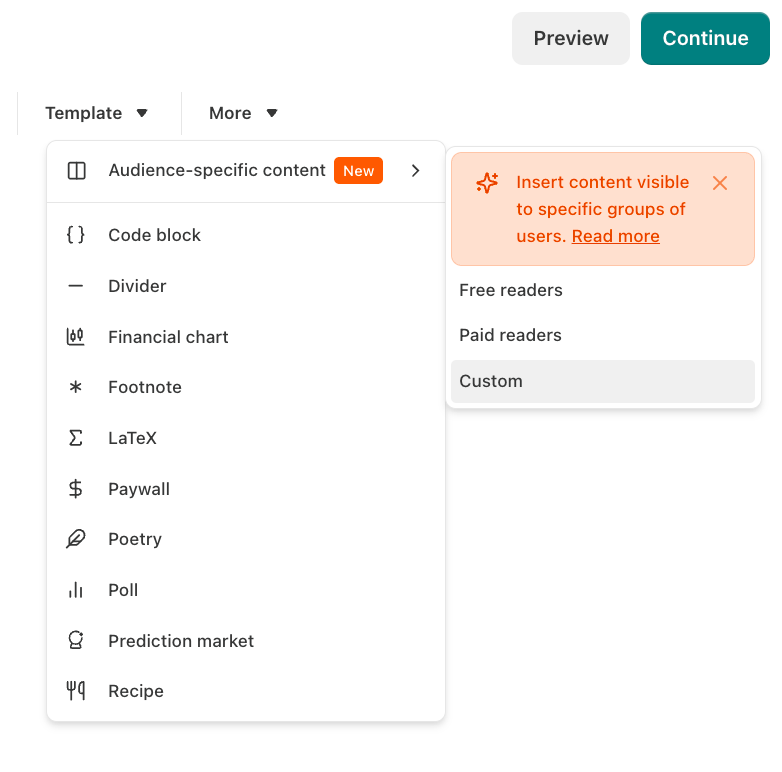
Open a draft, click More in the editor, choose Audience-specific content, and select Custom.
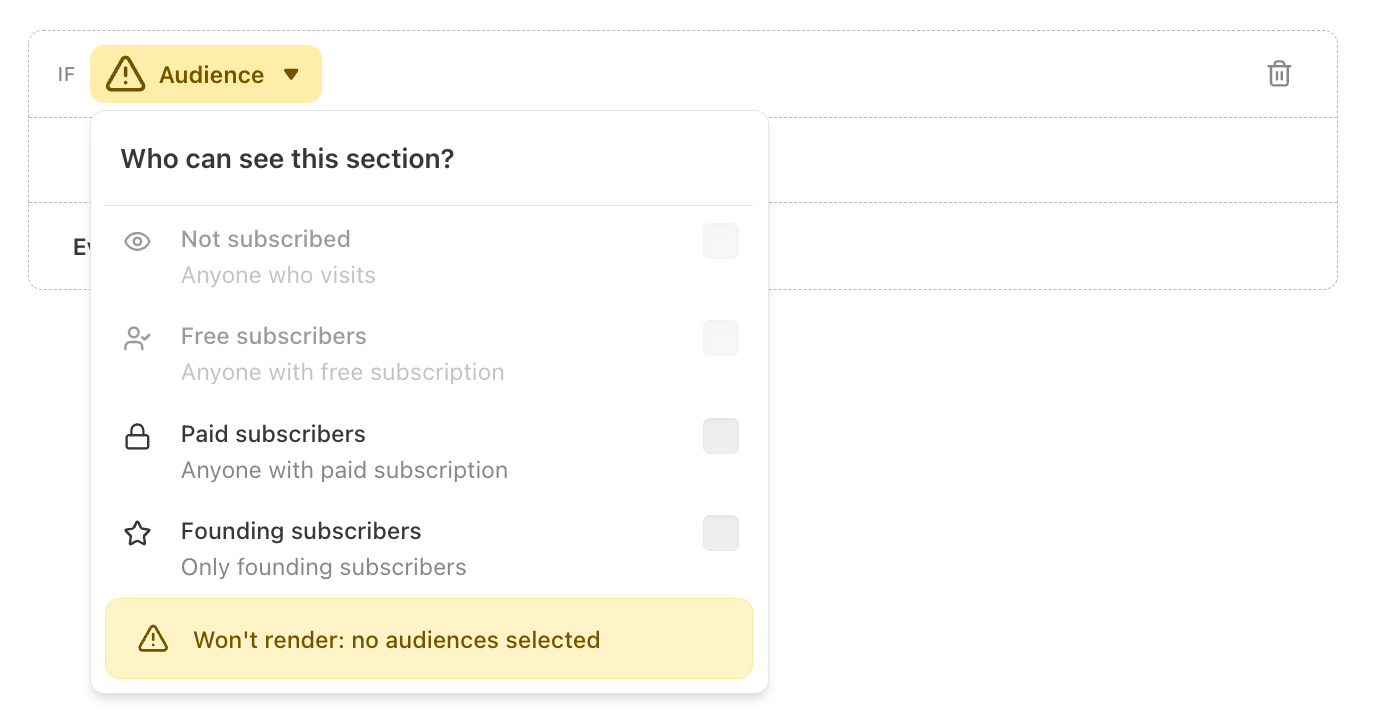
Use the audience drop-down to choose a tier, and add your content to the block. Add a For everyone else message for readers outside that group.
Finally, click Preview to confirm what each tier sees before you publish.

You can also save any audience-specific block you build as a reusable template, so you can add the same personalized content to future posts with just a couple of clicks.
10 Ways to Use Audience-Specific Content
There are many ways you can use these content blocks to convert new readers, serve your existing subscribers, reward and grow your base, or sell your products, but these are some of my favorites.
1. Build a Native Lead Magnet
A lead magnet is a free resource, like a checklist or an ebook, that readers get in exchange for subscribing. With audience-specific content, you can deliver a lead magnet directly within the post. Non-subscribers see a description of the resource and a subscribe button, while free subscribers see the actual file instead. As soon as non-subscribers click the subscribe button, they’ll see the lead magnet, too, meaning they can get instant access without leaving Substack or waiting for a confirmation email.
Need lead magnet ideas? Subscribe to get instant access to my free swipe file of really good lead magnets from 25 different niches!

2. Warm Readers Up Before Your Paywall
When a new reader who just discovered your publication hits a hard paywall, they’re unlikely to pay. At this stage they barely know who you are and they haven’t built enough trust in your publication yet. You can soften that ask by adding a step in between. Show non-subscribers a preview with a call to action to subscribe for free to keep reading, while free subscribers see the rest of the post. Now you’re giving new readers a reason to subscribe without overreaching. Once they’re already on your list, you can make the case for a paid upgrade later.
3. Give Every Tier Its Own Call to Action
Each reader is at a different stage of awareness and interest in your publication, and the best next call to action depends on where they are right now. A non-subscriber can't upgrade to paid yet, and a paying member has no reason to see a subscribe button. With audience-specific content, you put a different call to action in the same spot for each tier. For example, non-subscribers see a subscribe button, free readers see an upgrade nudge, paid members get a referral ask, and founding members get a bonus. Everyone sees the best next step for them, with no wasted attention on asks meant for someone else.
4. Show Social Proof to Cold Readers Only
Testimonials and other forms of social proof do their best work on people who haven't subscribed yet. Add that content to a block that's only visible to the Not subscribed group. Your subscribers have already bought in, so there's no reason to keep selling them.
5. Add a “Who I Am” Intro for Cold Traffic
When a post takes off and gets shared a lot, most of the new readers landing on it have no clue who you are. A short block for non-subscribers can introduce you while your subscribers (who already know you) skip right past it. A post that starts off with an introduction is much better positioned to convert that increased traffic into subscribers. A post that skips the intro risks leaving thousands of strangers confused about where they are and why they should care.
6. Personalize Your Welcome or Table of Contents Post
Plenty of creators pin a "start here" post to help new readers get their bearings, and longtime readers access their archive more easily. Show non-subscribers the full pitch for who you are and why they should subscribe, and show existing subscribers a warmer note that points them toward your best work. The same pinned post works as a sales page for strangers and a signpost for the people who already follow you.
7. Help Existing Subscribers Manage Their Subscription
Breaking your publication into Sections lets readers manage their subscriptions based on interests. They can receive emails for the Sections they’re interested in and skip others. But plenty of subscribers never realize this is an option. To highlight this feature, create a Not subscribed block with your subscribe call to action, and then use the For everyone else block to show current subscribers how to manage their section subscriptions. This typically makes the most sense at the top or bottom of your posts.
8. Reward Your Founding Subscribers
Your founding subscribers pay you the most, but they rarely get acknowledged for it. Share an early-access link or write a quick thank-you that only your founding subscribers see. A couple sentences can go a long way toward making sure your highest-value subscribers feel appreciated and want to stick around.
9. Ask Your Most Engaged Readers for Referrals
Your paid and founding subscribers are the ones most likely to recommend you, so put your referral ask in front of them and skip everyone else. A non-subscriber barely knows who you are and has no reason to recommend your publication yet so use the same space to to tell them why they should subscribe instead.
10. Run Personalized Promos and Product Offers
When you launch a product or run a sale, you can tailor your offer to each tier using the same post. Give your paid and founding subscribers early access or a discount that only they see, and show everyone else the standard offer with a reason to subscribe. Your whole audience hears about the launch, and your paying readers get a perk for sticking around, but you don’t need to write separate emails for each group.
Audience-specific content is a huge upgrade for Substack publishers. For the first time, a single Substack post can be personalized to each type of reader, which means it can convert newcomers and reward your most loyal subscribers at the same time.
💬 The ideas above are just a few possibilities to get you started and I’d love to hear what’s worked for you, too. If you’ve tried out audience-specific content, or seen someone do it well, share it in the comments!
To endless possibilities,
Casandra
Need More Help?
Really Good Business Ideas Premium: A membership designed to make starting and growing a profitable business easier. Full archive access, DM support, and a library of tools and resources.
Substack Creator OS: A complete operating system for planning, writing, growing, and monetizing your newsletter, all in one connected Notion workspace. (Right now, it’s free for Premium subscribers).
Work With Me Directly: Book a 1-on-1 consultation or coaching call to get personalized help when you need it. Think of it as a focused working session to get unstuck, gain clarity, or move something forward.
Build Your Brand on Substack: Whether you’re still deciding or ready to build, I’ll meet you where you are. I offer executive briefings and hands-on strategy sessions for marketing teams that want to win on Substack.

Excellent guide Cassandra. Thank you! 😊
As a new stub stacker, this was incredibly helpful. Thank you!