


Get 50% off your first year of an annual Premium membership until midnight on Cyber Monday, November 30.
Annual members get the Really Good Business Ideas Claude connector (with 14 tools for creators, marketers, and solopreneurs) plus free access to the Substack Creator OS.
I love sharing my knowledge and experience through educational content that helps people build successful businesses. But like everyone else, I need to earn a living, and Really Good Business Ideas is a business.
If I want people to find my content, there’s a lot more work to do beyond writing it, including:
Choosing strong hooks that get the right people to click.
Producing crisp social media graphics that stand out in feeds.
Adding the SEO titles, meta descriptions, and internal links that search engines and LLMs need to surface it.
At a big company, I'd have a whole team to split this work, but as one person, it all falls on me.
If you run a business on your own, you've probably experienced this too. You expect to spend your days on your craft, the work you started the business to do. Then you learn how many other things a business needs, and your craft ends up being a small part of your week.
AI Has Changed What One Person Can Do
Working alone has always limited how much a business can scale because there are only so many hours in a day. In the past year, AI has dramatically raised that limit for me. I still protect the time I need for what I’m best at, like writing, analysis, and growth strategy, but everything else takes far less time, so I get much more done.
Claude has been a big part of how I’ve scaled with AI. I’ve built Claude into the systems and workflows I use to run Really Good Business Ideas, with tools I’ve refined so it does the work exactly the way I would, only much faster. Starting today, you can use many of those tools too.
Why Most People Struggle to Use AI Effectively
Most people use AI as an expensive Google, or to draft emails they should have written themselves, and then decide it’s overhyped.
AI models are trained on an enormous amount of material, good and bad, and most of it has nothing to do with your business or your industry. Out of the box, it gives you a lowest-common-denominator answer that could fit anyone, because it lacks the nuance that comes from years of hands-on experience in your field.
I’ve seen generic AI answers cause problems in very different fields. For example:
Marketing: Business owners ask AI for marketing help and get advice that doesn't grow their business. Marketing is a competition for a limited number of spots: Only one ad gets the top slot, and only one page ranks first on Google. To stand out, you have to beat other businesses at some part of the process, which you can't do when you're following the same AI advice as everyone else.
Physical Therapy: A clinic recently told me they've seen more people come in with stress fractures from AI-made training plans. AI hasn't watched real people handle added mileage, so it misses the early warning signs a good physical therapist or coach would catch.
Talk to any expert in their industry, and they can probably tell you a similar story. We don’t know what we don’t know, and when we use AI for something we’re not knowledgeable about, it’s much harder to tell when AI is leading us astray.
How to Turn Your Expertise Into AI Systems
For the parts of your business you know best, you can turn your experience into systems AI can use, much like you’d train a new hire. A junior employee gets lots of feedback from working with you and encountering situations they haven’t seen before. Over time, they learn your standards and processes and become far more valuable to your business, and AI can improve the same way.
AI’s first attempt at a task is usually weaker than yours, and correcting it can take as long as doing the work yourself, or longer, which is where many people give up. The time savings come from making the task repeatable:
Note where AI fell short.
Add the correction to your instructions.
Save the instructions as a Claude skill, which is a set of instructions Claude follows every time it does that task.
With each round, the results get closer to what you’d produce yourself, and you spend less time on it.
For example, my first infographic with Claude took about as long as designing it myself in Canva. Each time something went wrong, I gave Claude feedback, and once the result looked better than what I'd have made in Canva, we turned everything we'd learned into a skill. Now a new LinkedIn infographic takes me about 5 to 10 minutes, and I still provide all the material, just as I did before.
AI systems work best on structured tasks, where the goal is to meet a standard rather than say something original. In most businesses, the tasks that fit fall into two groups:
Operations: The work around your craft that keeps the business running and helps people find what you publish, like audience research, planning, SEO metadata, internal links, and building tools and automations.
Production: Turning your finished work into something people can use. For example, formatting an ebook you wrote could take 10 hours manually but only a fraction of that with help from AI.
AI handles the structured work, so you can focus on strategy and the creative craft that sets your business apart.
For areas outside your own expertise, you can draw on someone else's, and the Really Good Business Ideas connector gives you mine. All of the Claude systems and tools that have increased my capacity came from iterative development and refinement. Each one builds on research I've published on Really Good Business Ideas, like a library of 200 proven hook templates and an analysis of 520+ paid subscriber benefits across 145+ Substack publications, and on 17 years of data-driven marketing and entrepreneurship. Recently, I started taking many of the tools that would be useful for my readers and generalizing them to plug into any business. Each one required hours of testing to make sure the output was the quality I would expect.
Introducing the Really Good Business Ideas Claude Connector
The Really Good Business Ideas Claude connector adds my tools to your Claude account. You set it up once, and after that Claude can use them in any chat.
I've been soft testing the connector for the past couple of months, and the feedback has been great. Today I'm launching it officially. I use some of the tools every day. Others build the strategic foundation your business needs to grow, like audience personas or an editorial style guide. Some, like the tool behind my Claude design system, took me months to refine.
The connector works on any Claude plan, including the free plan, and adding it only takes a minute.
Note: Free plans only allow one custom connector, so if you want to add connectors from other creators too, you’d need a paid plan.
Once it’s connected, simply ask Claude for what you need in plain words, like “Give me five headline ideas for this draft,” and it will use the best tool for the job.
What Tools Are Included in the Claude Connector?
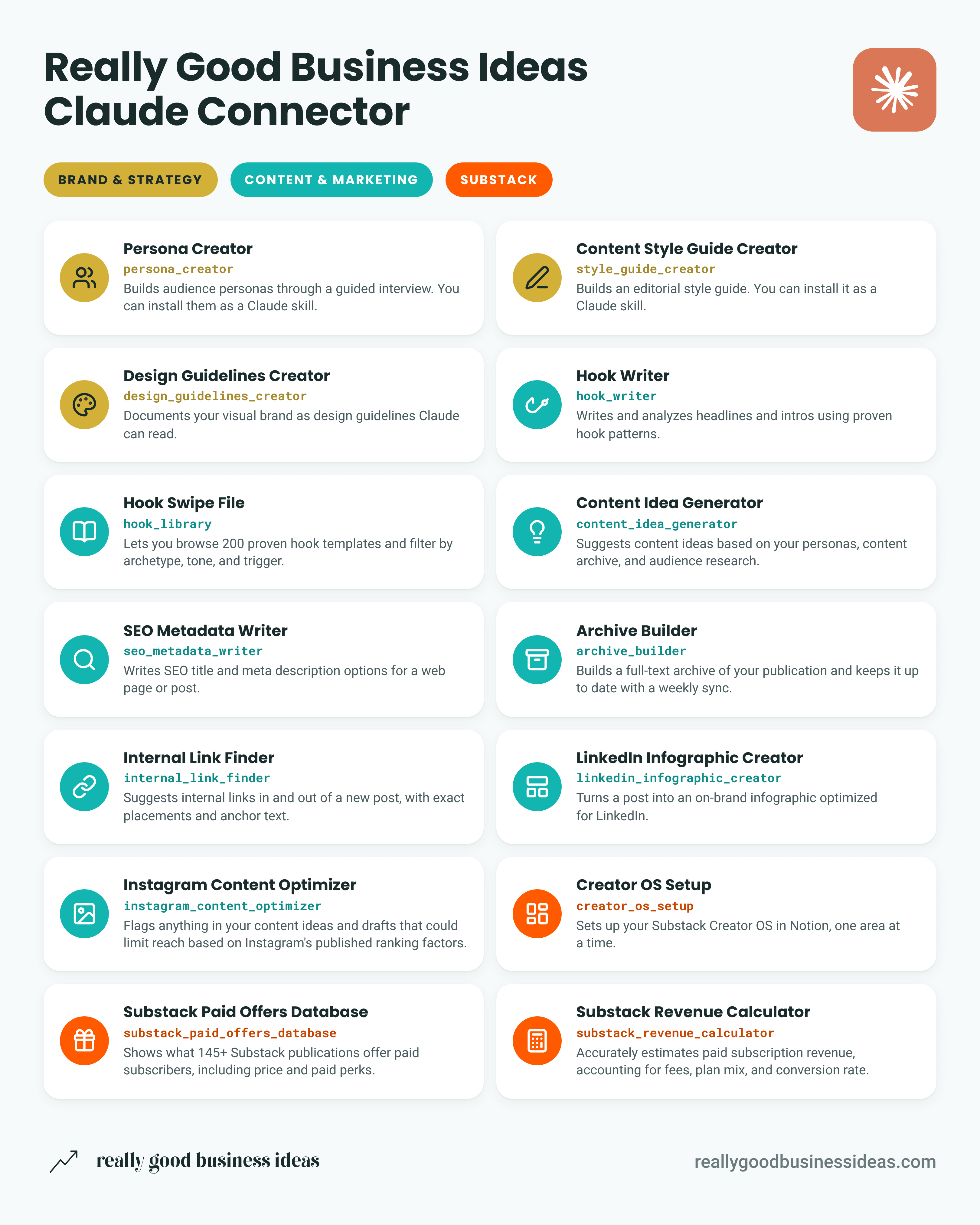
The connector has 14 tools to start. Eleven are skills that walk Claude through a task the way I'd do it, and the other three are two databases and a calculator.
How Do You Find Out What the Connector Can Do?
The connector has a built-in guide to every tool. Anytime you’re wondering how a tool works or which tools I’ve added, ask Claude, and the guide will explain each one with example prompts.
Example Prompt: What can the Really Good Business Ideas connector do?
Which Claude Skills Do I Use Daily?
I use four of the connector's skills on every post I publish. They handle the technical, almost scientific side of publishing: matching my message to a proven hook pattern, adding metadata for search engines, strategically linking the post to my already published content, and producing an infographic for sharing my message on LinkedIn.
Hook Writer
The Hook Writer writes hooks for anywhere you need one, from headlines and email subject lines to intros and ad copy. The skill uses 200 proven templates I’ve collected over years of working in online marketing, which are all in my hooks cheat sheet. You can also paste in a hook you’ve already written to find out which pattern it uses and how to make it stronger.
Anytime I’m struggling to figure out my intro, I ask Hook Writer for a few options to help me brainstorm. I may not use the exact hooks it suggests, but at least one of them will give me an idea for how I want to write it in my own words.
Example Prompt: Use the Really Good Business Ideas Hook Writer to suggest headlines for this draft.
SEO Metadata Writer
The SEO Metadata Writer looks at the live search results for your target keyword and writes SEO titles and meta descriptions that avoid the words competing results keep repeating, so your post stands out on Google. You’ll get three title and description options within the character limits, plus a recommendation for which one to use. Each one leads with what makes your post different. If you have a style guide, the options will follow it too.
I used to skip meta descriptions, even though I knew a strong one could improve my click-through rate from search. Now I always ask SEO Metadata Writer for three options and edit the one I like best.
Example Prompt: Use the Really Good Business Ideas SEO Metadata Writer to write an SEO title and meta description for this post.
Internal Link Finder
The Internal Link Finder suggests links in both directions for a new post: From your older posts into the new one, and from the new one out to older posts. Each suggestion comes with the exact place to put the link and the anchor text to use. Because Internal Link Finder searches your whole archive, it can turn up related posts you’ve forgotten about.
Internal links are extremely effective for helping search engines and LLMs discover more of your content, but it used to take me forever to search my archive and figure out which older posts needed links to a new one. Now, anytime I publish something new, Internal Link Finder gives me an easy-to-follow list almost instantly.
Example Prompt: Find internal links for this draft with the Really Good Business Ideas Internal Link Finder.
LinkedIn Infographic Creator
The LinkedIn Infographic Creator turns a post or draft into an infographic optimized for the LinkedIn feed, including the best size and resolution. If you have design guidelines or an editorial style guide, it will reference those.
The first time I designed an infographic with Claude, it took hours of back-and-forth while Claude figured out the right size and resolution, and even how to export the design as an image. Now the skill gives Claude all of those settings up front, so it gets them right the first time.
Example Prompt: Turn this post into a LinkedIn infographic with the Really Good Business Ideas LinkedIn Infographic Creator.
All 14 tools come with a Premium membership. An annual membership also includes the Substack Creator OS, and it’s 50% off your first year until midnight on Cyber Monday, November 30.
How to Set Up Your Style Guide, Personas, Design System, and Archive in an Afternoon
Four of the connector's skills build the foundation your other tools use: your style guide, personas, design guidelines, and post archive. Getting each of those right took me months of trial and error with Claude. With these skills, each one takes less than an hour, and you only have to do it once.
Content Style Guide Creator
A content style guide settles the small writing decisions once, like whether book titles go in italics or how to capitalize headings, so your brand sounds consistent in every post. A style guide also makes it much easier for a freelancer or guest writer to match your voice. The Content Style Guide Creator walks you through building yours in about 30 minutes, either by interviewing you or by reading two to five of your best posts. You get a finished guide to share with anyone who writes for you, plus a version Claude can follow for things like meta descriptions. My content style guide walkthrough explains what the guide should cover.
Example Prompt: Help me create a content style guide using the Really Good Business Ideas Content Style Guide Creator.
Persona Creator
The Persona Creator interviews you about your audience and builds one persona at a time, pushing back when your answers are vague. Real reader comments or survey answers make the personas much more specific, so have a few ready if you can. Other tools in the connector, like Content Idea Generator, can then use your personas to suggest ideas for the people you want to reach. I cover how to use personas in my audience personas guide.
Example Prompt: Help me build audience personas with the Really Good Business Ideas Persona Creator.
Design Guidelines Creator
The Design Guidelines Creator documents the brand you already have, including your logo, colors, and fonts, in a file Claude can reference, so you’ll need those before you start. From those building blocks, the skill works out rules for using them, like which color combinations go together and a recipe for each format you publish, such as a post header or a social graphic. Once you have the file, the graphics Claude makes for you follow your brand automatically. I walk through the system behind the skill in my post on building a design system for Claude.
Example Prompt: Document my brand as design guidelines with the Really Good Business Ideas Design Guidelines Creator.
Archive Builder
The Archive Builder skill pulls the full text of everything you’ve published into one archive, whether your site runs on Substack, WordPress, Ghost, beehiiv, or anything with a sitemap. A weekly sync picks up new posts and edits to old ones. The archive is saved to a folder on your computer, so it also doubles as a backup of your Substack posts. You’ll need the Claude desktop app to build it. Internal Link Finder runs on this archive, so build it first.
Example Prompt: Build an archive of my site with the Really Good Business Ideas Archive Builder.
What Research and Planning Tools Come With the Claude Connector?
Five of the connector's tools are for the research and planning you come back to week after week, and you can use them as often as you like.
Content Idea Generator
The Content Idea Generator helps you brainstorm what to write next, from fresh topics and new angles to follow-ups on posts that did well and new formats for old ones. The skill also draws on anything you've set up, like your personas, post archive, analytics, or Creator OS, and asks a few quick questions to fill in the gaps. You get 12 to 20 ideas grouped by where each one came from, and any numbers it cites come from your own data.
Example Prompt: What should I write about next? Use the Really Good Business Ideas Content Idea Generator.
Substack Paid Offers Database
The Substack Paid Offers Database covers 520+ paid subscriber benefits from 145+ publications across 29 Substack categories. Each benefit is sorted into one of the 11 types of paid subscriber perks from my research, so you can see what publications like yours offer before you set up your own perks.
Example Prompt: What do business newsletters offer paid subscribers? Use the Really Good Business Ideas Substack Paid Offers Database.
Substack Revenue Calculator
The Substack Revenue Calculator estimates your income from paid subscriptions after Substack’s 10% fee and Stripe’s payment fees. Give it your prices and your free or paid subscriber count. If you don’t know your conversion rate, the calculator defaults to 3%, the median from my research on paid conversion rates. For your mix of monthly, annual, and founding plans, it uses smart assumptions based on your pricing strategy. You can adjust any of the inputs and keep comparing scenarios, like how raising your monthly price from $8 to $10 would affect your revenue.
Example Prompt: I have 4,000 free subscribers. If I launched a paid plan at $8 a month or $80 a year, what would I make? Use the Really Good Business Ideas Substack Revenue Calculator.
Hook Swipe File
The Hook Swipe File lets you browse all 200 hook templates yourself. Each one comes with a fill-in-the-blank formula and an example, and you can filter by type, tone, emotional trigger, or keyword.
Example Prompt: Show me curiosity hooks from the Really Good Business Ideas Hook Swipe File.
Instagram Content Optimizer
The Instagram Content Optimizer reviews your plan for a post or reel, from a one-line idea to a full caption and script, against the ranking factors that Instagram and its head, Adam Mosseri, have shared publicly, and makes suggestions on what to change to improve its reach. My Instagram algorithm guide covers them in detail.
Example Prompt: Check this reel script with the Really Good Business Ideas Instagram Content Optimizer before I film it.
How Does the Claude Connector Work With the Substack Creator OS?
Several of the connector’s tools work with the Substack Creator OS, so what you make in Claude goes straight into the workspace where you plan and run your Substack. Annual Premium members get the OS free, along with every update I make to it.
I first released the Creator OS in November 2025, and I’ve continued to improve it since. Recent updates for annual Premium members include:
A completed example workspace for a sample cooking newsletter, so you can see what each page looks like when it’s done.
A library of 110+ Really Good Business Ideas articles, each with a one-line summary, sorted by hub and filterable by topic.
A Paid Subscriber Perks tracker for planning what each tier gets, with a pre-sized Canva template for perk images.
Substack Creator OS Setup With Claude
The Creator OS Setup skill takes a fresh copy of the OS and sets it up for your publication. Starting from your public Substack pages, it suggests a short plan and fills in the OS one area at a time, showing you each change before it saves anything. If you stop partway through, you can run it again later and pick up where you left off.
Example Prompt: Set up my Creator OS with the Really Good Business Ideas Creator OS Setup.
Which Tools Save to the Creator OS?
Six of the connector’s tools can save into the OS once you connect Notion to Claude:
Persona Creator: Your personas go to Audience Personas in the Strategy Vault.
Content Style Guide Creator: Your guide goes to the Editorial Style Guide page, and your voice attributes go to the tone table in the Brand Vault.
Design Guidelines Creator: Your colors and fonts go to the Brand Vault, along with a backup of your full guidelines.
Hook Writer: Your chosen hook goes to the matching post in your Content Calendar or Social Media Calendar.
Content Idea Generator: The ideas you keep go to Idea Capture.
SEO Metadata Writer: The title and description you pick go to that post’s SEO section in your Content Calendar.
How to Get the Claude Connector and the Substack Creator OS
The Claude connector and the Substack Creator OS are both included in an annual Premium membership to Really Good Business Ideas. Membership is normally $100 a year, which is already less than the Creator OS costs on its own. But right now, during my Black Friday sale, you can get 50% off your first year until midnight on Cyber Monday, November 30. Your membership includes:
The Really Good Business Ideas Claude connector, with all 14 tools and new tools as I add them.
The Substack Creator OS, which sells for $149 on Gumroad, plus every future update.
100+ validated business ideas, original datasets, and playbooks.
A direct line to me when you get stuck.
I built these tools to help you spend more time on the work you love, and I'd be honored to help you grow your business in the coming year.
The sale ends Monday, November 30.
To endless possibilities,
Casandra
💬 Which tool should I build for the connector next? Leave a comment and tell me which publishing or marketing task you’d most like to hand off.